Udacity Disaster Response Project Blog

A Tool to Distribute Support: Udacity Disaster Response Project Blog
The applidcation here represents the Project 2 of Data Science Nanodegree Course.
Conceptual Context
The idea is to bundle and classify queries in case of one or multiple disaster, coming on different input channels as short text notes.
The resulting classification might help to direct officials or NGO helpers of different capabilit to scenes where they are really needed.
CRISP-DM Process: Pose and Answer Questions
- Business Understanding
- see above, fast decision making in a highly turbilent information chaos
- Questions: no arrived, will be checked in time
- Data Understanding
- Data consists of a big heap of natural language short texts, tweets.
- content of tweets was already translated to englisch, and the channel, the data came from, was noted: direct, news, social.
- the english texts were externally tagged regarding 36 different criteria enabling decision making in emergency situations
- Data (tweets and tags) are available in two different files, about 27000 entries.
- Prepare Data
- Data mangling in this case means, associating the tags with the twetts by merging the tables according to common ID.
- The main task was the parsing and distributing of the string - one column - 36 category description to 36 different binary yes no related columns
- Loss of data: 206 duplicates were to be removed.
- Thus, it remains 26000 tweet message texts, tokenized, and lemmatized, and 26000 x 36 tag matrix
- Data Modeling
- Data modeling is done using a MultiOutputClassifier, based on a RandomForestClassifier.
- after creating a Machine Learning Pipeline, optimization of model was done using GridSearcgCV.
- Due to last points, the model was saved as a binary pickle.
- Evaluate the Results
- Evaluation of the results is done by a FLASK web app.
- As this will not be deployed publicly, here a description of functionality. 5.b Flask App:
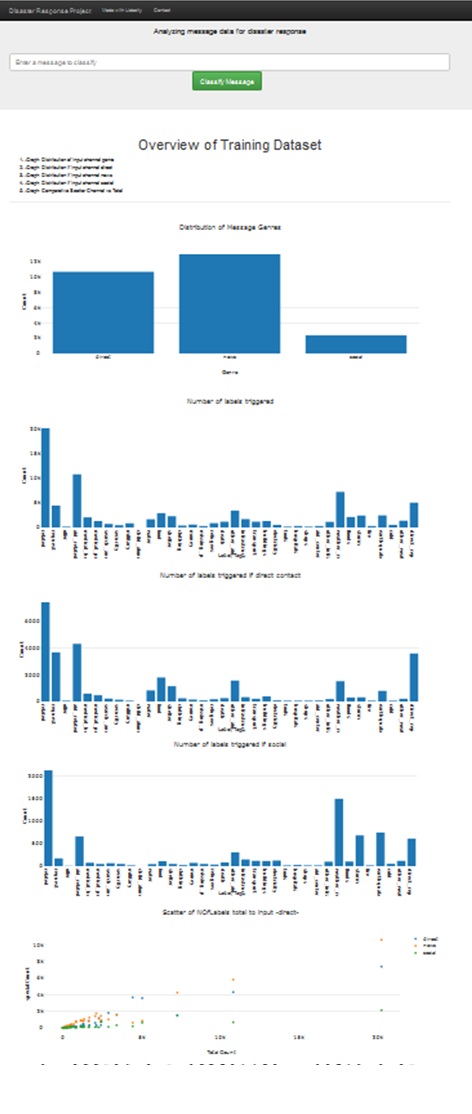
- requesting a html page from the flask app, it will analyze the data warngling sql database and give some overview statistics.
- immeadtiately the saved pickle of the learned model is loaded.
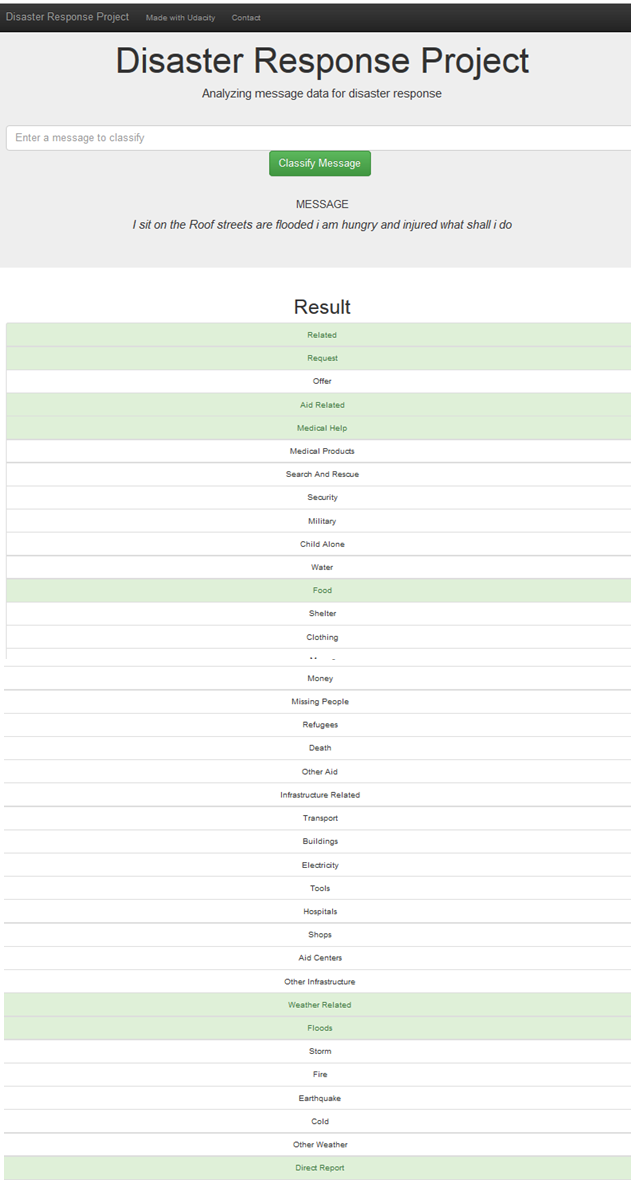
- There is an input field to enter a natural language tweet text, and a button to ask for evaluation.
- The model includes tokenizer and lemmatizer, thus the tweet is transformed as usable input to the prediction stage of the model,
- and a graphical estimation of matched categories is shown.
- Deploy
- At the moment local app, can be used with local FLASK debug server.
Questions
The questions arising here a questions of imbalance , quality and relative reliability. So far there is no catalog and no further strategy from my side.
Structural Concept:
ETL:
- load_data(messages_filepath, categories_filepath) get the csv files as pandas Dataframes
- clean_data(df) merge the two table by a join with common ID, check for duplicates, remove duplicates
- spread the one string representation of 36 category tags into 36 binary columns.
- save_data(df, database_filepath) put it allm into a sqlite3 database file in sql format
ML:
- load_data(database_filepath) gets database sql –> Dataframe, creates test and train data
- provide an tokenizer that will remove puntuation, split into tokens and lemmatize tokens (using re and nltk)
- build_model() creates pipeline of vectorizer and MultiOutputClassifier and RandomForestClassifier
- model is trained…. and evaluation results to stdout….
- model is saved !!! Due to slow computer optimizing took to long… use flask with non opt model …!!!
- optimize_model(model, X_train, Y_train) via GridSearch , two RndomForest parameters are spnned to find an optimuum.
- This was set as an extra call, as it took to long at my site.
- and evaluation goes to stdout
- opt. model is saved !!! Due to slow computer, I never reached this in test, sorry!
FLASK:
FLASK side (backend) - run.py
- provide the same tokenizer, as the model will call it
- load databaseand model
plotly side (frontend) (templates…html),
- create basic layout, with
- form to submit and
- carry the ginger and flask induced variables and scripts to provide the plotly functions with the necessary backend information.
Results:
Titlepage:
Example Query:
Conclusion
Idea marvelous, results astonishing, for reliable tool, has to be improved, and checked , but ….nice!
Thanks
…to Stack Overflow and figure eight for making their data available and to Udacity for the oportunity to handle it.